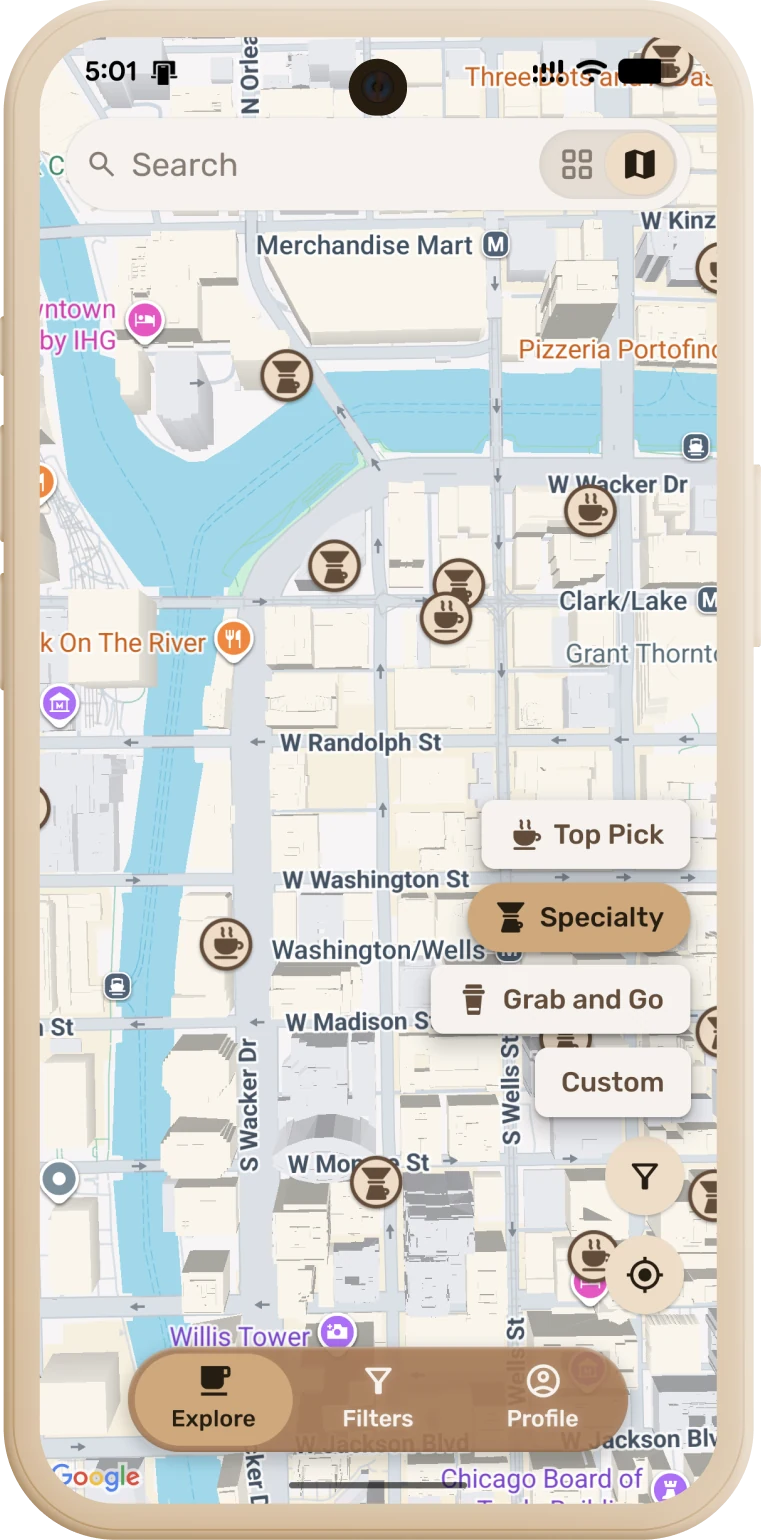
Find coffee shops nearby — and know exactly what you're walking into.
Atmosphere, noise, coffee quality, equipment, and more, tagged by
people who've actually been there.
Scan to install
Thank you — and a big change coming
People have been joining, adding places and tagging them, and that’s the part of this app nobody could have bought — thank you. Now the honest part: the map underneath comes from Google, and it costs money every time someone opens a part of the world the app hasn’t seen before. Growing and staying free pull against each other, so the map is being rebuilt on OpenStreetMap, with everything you’ve added sitting on top. Expect it to take a while, and expect this to be the last release before it. See what’s coming.
It works without location now
Declining location no longer breaks the app. It used to fall back to New York and search there, so people elsewhere were quietly shown another continent — and reported seeing no coffee places at all.
The map opens somewhere plausible instead, guessed from your time zone, and you can search any area you pan to.
The location prompt is a dismissible notice rather than a permanent banner over the place name. It stops asking after a couple of launches; the reminder moves to Profile › Preferences, and disappears entirely once access is on.
Honest about degraded results
If we can’t reach the map provider you now get our own saved results with a “showing older results” note, instead of an empty map.
If searching brand-new areas is paused because the month’s map budget ran out, Profile says so and names the date it resets — rather than leaving you to guess why new areas come back empty.
Empty screens no longer claim a search radius that was never used.
Specialty means the coffee, not the rating
A shop selling coffee alongside groceries is no longer Specialty.
A café that also serves food still is — serving lunch says nothing about the espresso.
Where people have reported the beans, the roasting or the machines, that now outranks the star rating. Stars measure how much people liked the place; they were never a measure of the coffee.
Fixes
A crash when the map redrew its pins (iOS).
The map stopped following the system dark theme — it stays light until there’s a real theme setting.
Now on the App Store and Google Play
Your Dial is public — anyone can install it, no invite or test link needed. It stays free, with no ads and no sponsored placements.
Custom filters, from the start
Custom is there the first time you open Filters, instead of appearing only once you’d already built something custom — which meant the way in was hidden behind the thing it led to.
It starts from wherever you were: switch from Specialty or Top Picks and Custom opens already set to that preset’s rating, so you adjust one thing rather than rebuilding from nothing.
If you’d like to chip in
There’s an optional tip jar for anyone who wants to support development. It’s entirely optional — nothing in the app is locked, and nothing changes if you never touch it.
What you save is yours, on every device
Favourites, hidden places, the places you added and the things you reported now live with your account — sign in on another device and they’re all there. They used to sit on one phone.
Un-hiding sticks: bring a place back on one device and it stays back, instead of returning later from a device that hadn’t caught up.
Reported something? It stays hidden for you everywhere. Your report was recorded on the server while the “hide it from me” half stayed on one device.
A café you favourited in another city now turns up in search, wherever you are.
Saved things before signing in? Creating an account brings them with you.
Your privacy, tightened
Deleting your account now deletes everything — on our servers as well as on the device.
An unfinished review can’t be seen by the next person to sign in. A draft you hadn’t submitted was saved per place rather than per account, so it sat waiting in the form on a shared phone.
Your tag habits are yours. The counts that order filter chips used to be shared by everyone who signed in on the same device.
Your tags show up instantly
A tag you add is on the place right away. Tags used to need several people before they appeared at all, so adding one looked like nothing happened — the community count still decides when everyone sees it.
Your own tags filter your feed too: pick one in Filters and the places you tagged actually match.
Reuse tags you’ve written before on any other place instead of retyping them.
Filters match what the community said, not just Google’s yes/no flags — so food and amenity filters find places Google never labelled.
Map & search
Searching a new area returns that area. Some results were coming from wherever you’d been before — occasionally hundreds of miles away.
Tapping a search result responds immediately, instead of sitting there for a couple of seconds like a dead tap.
A saved place appears once, not twice — a favourite and Google’s own entry for the same café were showing up separately.
“Search this area” appears when you’ve moved somewhere new, not every time the map recentres itself.
Turning filters off really turns them off — a clean slate, not the default preset still quietly applied.
Dense areas no longer stop short. Where a city held more cafés than could come back at once, the extras were silently dropped.
Closed cafés
Permanently closed places are out of the feed instead of sending you to a shuttered door.
Temporarily closed ones say so — on the tile, the place card and the hours — rather than a plain “Closed” that reads like it’s just after hours.
Nothing happens silently
Reporting, flagging, withdrawing and deleting show they’re working, and tell you when they fail. These used to assume success: if the write never reached the server, the app looked like it had worked anyway.
Flagging a place can’t hang forever — if the network stalls it gives up and tells you, instead of leaving the screen up with no way out.
Signing in shows progress and surfaces failures instead of stalling.
You can’t report your own tags — there was nothing there to moderate.
When there’s nothing to show
The empty screen tells you which kind of empty it is — genuinely quiet nearby, or filters too tight — and when it’s the filters, it points you at the button that fixes it.
Hidden places can always be brought back. Everything you’ve hidden is listed in Profile → Hidden by you, each with a Withdraw.
Fixes
Photos that fail to load fall back to the warm coffee backdrop instead of an empty frame.
Rating-only reviews display properly rather than as a blank card.
Long tag names stop being cut off — chips fit their text and wrap.
A filter you’ve selected stays deselectable even after its option drops off the list.
Consistent 16pt screen margins across the app.
A rating that knows what it’s rating
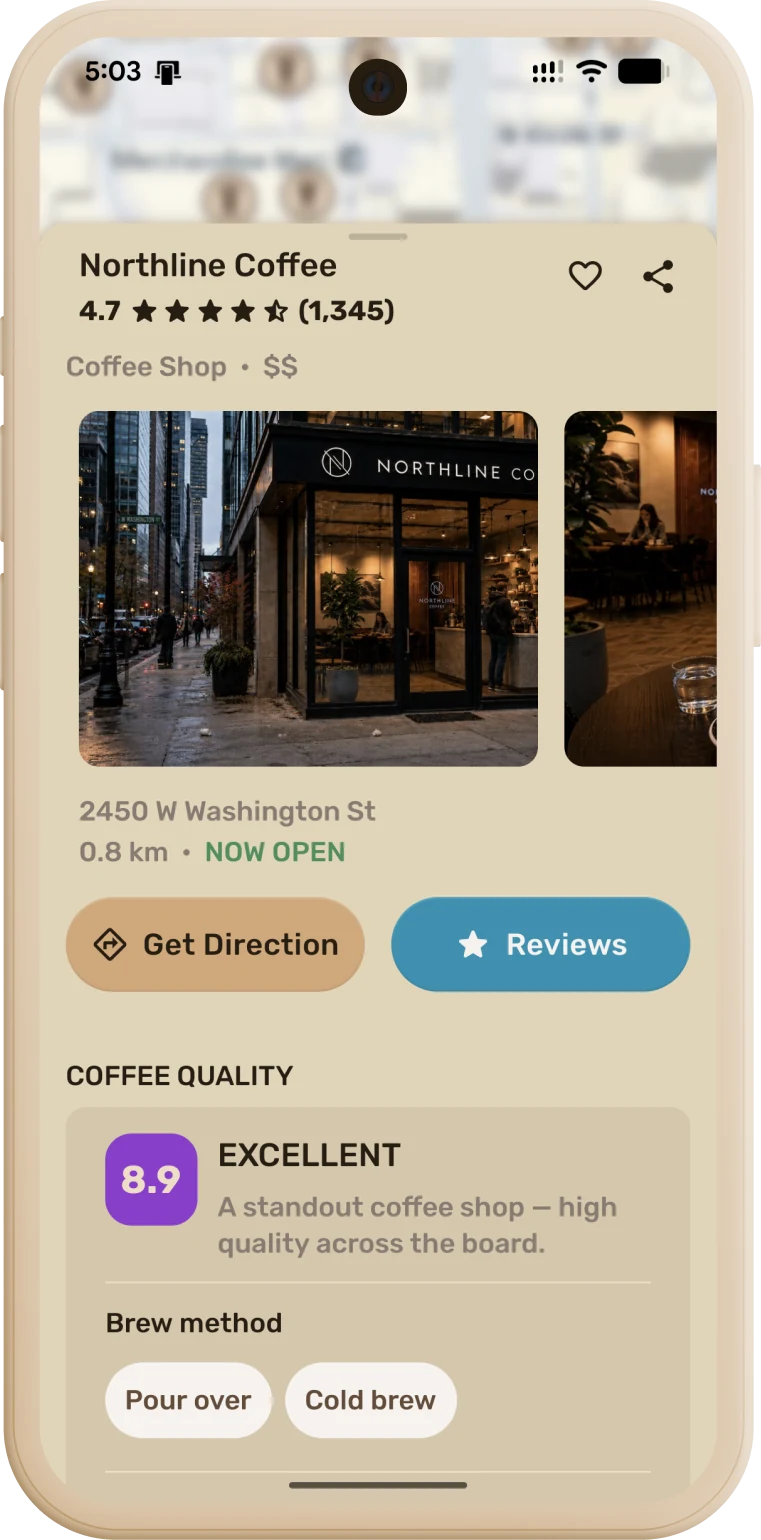
Scores now judge the coffee, not the business — so they’ve moved on purpose. Google stars rate the whole place; a beloved bakery’s 4.8 says nothing about its espresso.
Places built around coffee score higher, and spots where coffee is a sideline score lower. A 9.0 stays hard-earned — that boost alone can’t reach the top band.
The same score now drives everything: the badge on a place, the Specialty and Top Picks collections, the order places appear in, and the rating filter. So a well-rated sandwich shop no longer turns up under Specialty.
Ratings are weighed against the hype — a 4.9 from eight reviews no longer outranks a 4.9 earned over thousands.
Fixes
Editing your own review works again — it used to spin and fail if your review had been verified or moderated.
Review tags stop jumping around: in fixed lists like Atmosphere (Relaxed → Lively) chips hold their order instead of leaping to the front when picked.
“Reviews” on a place now lands on the Leave Review button instead of scrolling past it.
Pull-to-refresh keeps the area you searched — refreshing after panning to another city no longer snaps back to where you’re standing.
Spacing polish between sections in the review flow and Filters.
A new grid view
Big overhaul of the place list — it’s now a grid view that’s quicker to scan and more useful for exploring.
Tap a place to open its details right in the list — no jumping to a separate screen.
Your reports, in one place
New “Hidden by you” screen in your Profile lists everything you’ve hidden — places, tags, and reviews — each with a one-tap Withdraw to bring it back and take back your report.
Clearer timestamps everywhere: “5 mins ago”, “2 months ago” — no more ambiguous “m”.
Polish
“Settings” is now “Profile”, with a matching icon.
Withdrawing a report now fully clears it — the place comes right back for you.
Distance & hours
Distances are now measured from where you are — a place you’re browsing in another city no longer shows a misleading tiny distance.
“Open now” respects each place’s own timezone, so travelling or roaming no longer wrongly hides spots that are actually open.
Smarter filters
The place count now matches what’s on the map and list — no more phantom results.
Pan the map to a new area and the refresh button appears, so you can re-search wherever you’ve moved — not only after changing a filter.
Changing any filter turns filters back on if you’d switched them off, so your tweaks always take effect.
Review tags are ordered by popularity too, matching the filter chips.
Fixes
The Filters refresh button no longer occasionally reads see-through, and its icon is optically centered.
Share & discover
Share a coffee spot — send any café with a friendly message and a link that previews the place by name and opens it right in the app.
The share button now stays visible on a place card — no scrolling to find it.
Smarter filters
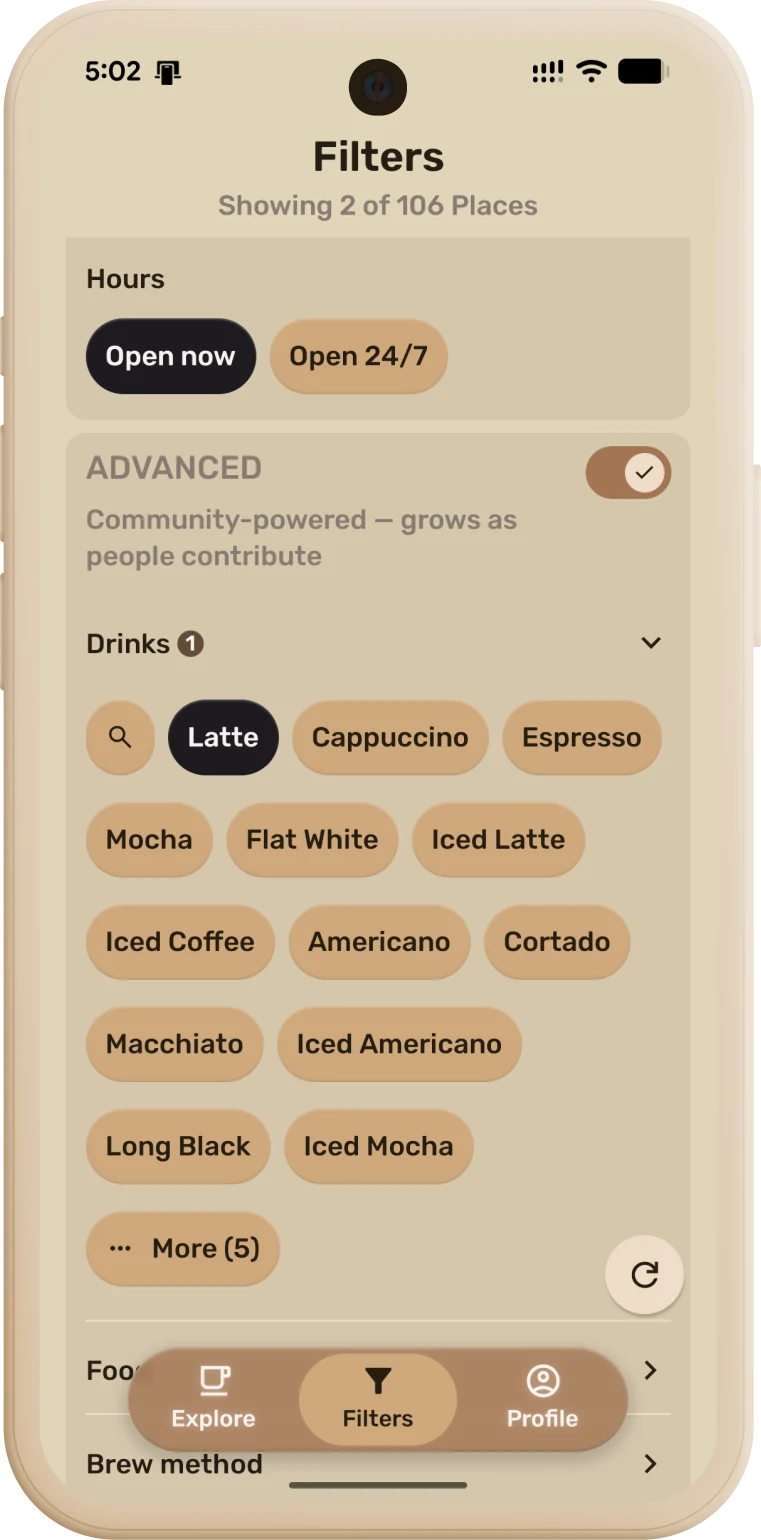
Filter options are ordered by popularity — the picks people actually want (latte, cappuccino, flat white…) show first instead of hiding under “More.”
The price filter is taking a break while we make it community-powered — Google’s café prices weren’t reliable.
Support & account
Support Your Dial on Ko-fi — an optional tip (the coffee kind!) that helps cover running costs like maps and servers, so the app can stay free and ad-free. Find it in Settings.
Delete your account anytime from Settings.
Tablets & onboarding
Onboarding now lays out correctly on tablets, in both portrait and landscape.
On iOS
Native Liquid-Glass controls and close buttons, with polish throughout.
Fixes
7-inch tablet onboarding overflow, a see-through button on the Filters screen (iOS), and a redundant close button on Android pop-ups.
New
Drinks filters & tags — find and tag places by specific drinks (flat white, red eye, americano, latte, cortado…), separate from brew methods.
Search inside filter categories — big filter groups now have a search box and a More expander, so you can find a tag fast.
Report inappropriate content — flag a bad tag or review; it's hidden for you instantly, and taken down for everyone once enough people report it.
Improved
Tags work across languages — the same idea in different languages merges into one tag instead of duplicating (e.g. шмель ↔ bumblebee). Currently only supports RU and ENG.
Full RU + ENG labels on every filter option.
Smoother reviews — steps now slide, the buttons stay put while content moves, tag search is available while you review, and a spinner shows while your review saves.
New
First internal test build.
First, thank you. People have been showing up, adding places, tagging them and leaving ratings — and that’s the part of Your Dial nobody could have bought. Here’s what’s coming, in the order it’s coming. No dates: this is built in the evenings, and a date would be a promise rather than a plan.
Now
A new map underneath, with Google optional
Right now the map comes from Google, and it costs money every time someone opens a part of the world the app hasn’t seen before. The more people use Your Dial, the more that costs — so growing and staying free pull against each other, and a map bill ends up deciding who gets to use it. So the map underneath is being rebuilt on OpenStreetMap, the free map anyone can contribute to, with everything you’ve added sitting on top of it. Google stays available as an option rather than the only way in. It’s the biggest change so far and it will take a while, but nothing you’ve contributed goes anywhere.
Next
Your contributions, kept separate
The tags, the ratings, the places you’ve added — all of it gets stored on its own, apart from whoever supplies the map. Whatever changes underneath, your work stays yours and stays put.
Next
Better control of your favourites
Saving a place is easy; living with a few hundred of them is not. Ways to sort what you’ve saved, group it how you actually think about it, and tidy up the ones you’ve outgrown.
Next
Roles and badges
The people who add places, tag them and keep them accurate are doing the work the app runs on, and right now that’s invisible. Visible standing for contributors, and proper roles for the people who help keep things clean.
Next
Opening up how it works
The code behind the app gets published, so what it does with your data is something you can check rather than something you have to take our word for.
Later
Sharing what we’ve all built
Everything the community has gathered about these places, opened up for anyone to use. It comes last because doing it properly means getting the legal side and your privacy right first — and that part can’t be rushed.